Glippy MCP Server
10 Categories. 240+ checks. One Friendly Paperclip. GEO analysis tool for any MCP-compatible AI assistant (Claude, Cursor, VS Code, Windsurf, Zed, Cline, Warp, and more). Analyze domains for AI-readiness directly from your AI workflow.
Built for Scale
Nine tools, 240+ checks, up to 50,000 URLs per run. Here are seven workflows teams run through Glippy MCP every day.
1. Enterprise site migrations 50K URLs / run
Replatforming from WordPress to a headless stack? Moving from Shopify to a custom build? Point Glippy at both the old and new sitemaps and let your AI client diff GEO readiness across every URL in a single conversation.
- Catch regressions at scale: structured data,
llms.txt, canonical tags, and AI-crawler access checked across thousands of pages in one bulk run. - Ship with confidence: pipe the delta straight into Jira, Linear, or a Google Doc without building a custom migration dashboard.
- Repeatable: re-run the same prompt weekly during the migration window to track progress toward parity.
2. Multi-brand & multi-domain portfolio monitoring Unlimited domains
If you own a portfolio of brands, run a roll-up, or manage dozens of country-specific domains, Glippy lets your AI compare GEO health across all of them side by side - without licensing per domain.
- One prompt, whole portfolio: "Check all my brands on this list and rank them by GEO score."
- Find the weakest link: the LLM spots the ccTLD or sub-brand that is dragging the group down, and suggests which checks to fix first.
- Track drift over time: re-run monthly and have the agent summarise what changed since last time.
3. Agency client reporting at scale 50 seats
Agencies running GEO for dozens of clients don't have time to build a reporting pipeline. Glippy turns any AI chat into one: scan the client site, ask the LLM to draft the executive summary, and export a branded report.
- Agency license covers 50 activations - one per analyst, strategist, or automation agent on your team.
- Export in MD or HTML straight from the chat; drop it into your client portal or Notion without reformatting.
- Hand it to OpenClaw or any agent framework to run the whole retainer cycle - scan, summarise, recommend, send - unattended.
4. Competitive benchmarking across an industry 20-50 competitors
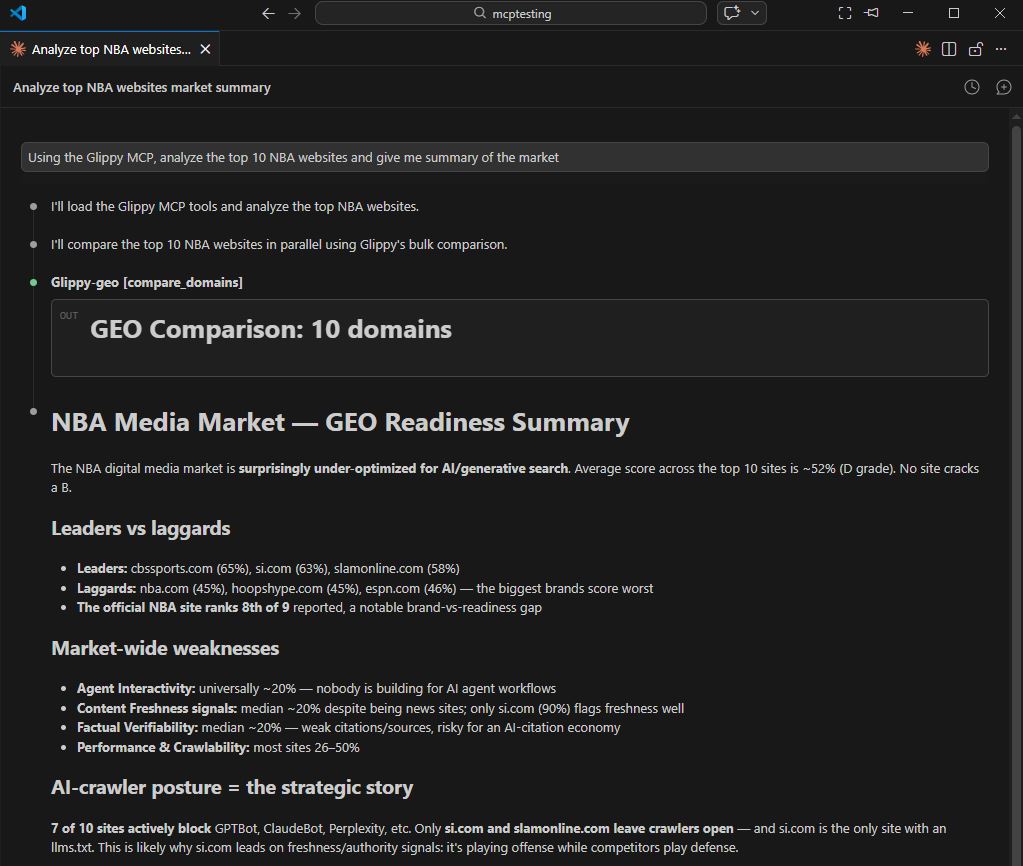
Hand your AI a list of 20-50 competitor domains and ask it to benchmark the entire category. Glippy runs the full 240+ checks on each; the LLM synthesises the pattern.
- Find category-wide gaps: "Nobody in this list has a proper
FAQPagemarkup - here is the competitive opportunity." - Position your pitch: export a slide-ready comparison table with your score vs. the industry median.
- Track challengers: re-run quarterly and ask the agent which competitors improved the most.
5. Large ecommerce & SaaS sitemap audits 50K URLs / run
Product catalogues, doc sites, and long-tail blog archives routinely hit tens of thousands of URLs. Glippy's bulk sitemap analysis chews through up to 50,000 URLs per run so your AI can reason about the whole site, not just the homepage.
- Sample intelligently: ask the LLM to focus on product-detail pages, or only URLs without structured data.
- Prioritise fixes by traffic tier: paste a GSC top-URLs export and have the agent map GEO issues onto revenue impact.
- Doc-site coverage: verify that every help article is AI-crawlable and has the schema signals LLMs cite.
6. CI/CD and pre-launch GEO gates Per deploy
Because the MCP server is just a tool any agent can call, you can drop it into a coding agent that runs on every staging deploy. Fail the build when GEO score drops below threshold; block the PR when robots.txt starts blocking GPTBot.
- Pre-launch smoke tests: a Claude Code or Cursor agent runs Glippy against the staging URL before green-lighting a release.
- Schema drift alerts: detect when a template change silently removes
ProductorFAQPagestructured data. - Policy-as-prompt: codify your GEO rules in a single agent prompt instead of maintaining a custom linter.
7. Content operations & editorial prioritization Portfolio-wide
Publishers and content teams with thousands of articles can't rewrite everything at once. Glippy gives your AI the signal it needs to decide what to rewrite first.
- Auto-prioritise the backlog: "Scan these 5,000 URLs and give me the 50 articles where a small edit would most improve AI citability."
- Feed the briefing agent: pipe Glippy's findings into your content-brief workflow so writers get GEO-ready briefs automatically.
- Measure the uplift: re-scan after edits and ask the LLM to summarise how many checks now pass.
Personal
For individual developers and consultants
- 1 instance activation
- All 9 analysis tools
- Bulk sitemap analysis (up to 50K URLs)
- Compare multiple domains
- Export reports (MD/HTML)
Pro
For power users and small teams
- 10 instance activations
- All 9 analysis tools
- Bulk sitemap analysis (up to 50K URLs)
- Compare multiple domains
- Export reports (MD/HTML)
Agency / OpenClaw
For agencies and large teams (of agents!)
- 50 instance activations
- All 9 analysis tools
- Bulk sitemap analysis (up to 50K URLs)
- Compare multiple domains
- Export reports (MD/HTML)
- Priority email support
Quick Setup
Install the MCP server
Run npm install -g glippy-mcp or use npx -y glippy-mcp in your MCP config.
Set your license key
Add GLIPPY_LICENSE_KEY=your-key to your environment variables.
Start analyzing
Ask Claude to "analyze example.com for GEO" and watch the magic happen.