Features & Checks
Glippy analyzes your web pages across 10 GEO (Generative Engine Optimization) categories with 240+ individual checks. Here's everything the extension evaluates.
Scoring system
Each check contributes to a category score, and all category scores combine into your overall GEO Score.
Overall score
- Displayed as a number from 0 to 100 in a circular ring
- Higher is better — it reflects how well your page is optimized for AI agents and generative search
Letter grades
| Grade | Score range | Meaning |
|---|---|---|
| A | 90 - 100 | Excellent — your page is well-optimized for AI agents |
| B | 80 - 89 | Good — minor improvements possible |
| C | 70 - 79 | Average — several areas need attention |
| D | 60 - 69 | Below average — significant improvements needed |
| F | Below 60 | Poor — major GEO issues to address |
Category weights
Not all categories contribute equally to the overall score. Categories with higher weights have more impact:
| Weight | Impact | Categories |
|---|---|---|
| 1.5x | Highest | Structured Data & Schema, Machine Readability |
| 1.3x | High | Citability & Answer-Readiness |
| 1.2x | Above average | Semantic HTML |
| 1.0x | Standard | Accessibility, Internal Linking, Meta & Discoverability, Entity & Authority |
| 0.3x | Low | Performance & Crawlability |
| 0.2x | Emerging | Agent Interactivity (WebMCP) |
Check status indicators
Each individual check is marked with one of four statuses:
- Pass — Check passed, contributing full points to the category score
- Warn — Partial compliance, contributing some points
- Fail — Check failed, no points contributed
- Info — Informational only, does not affect scoring
The 10 GEO categories
Below is each category with its purpose and what Glippy checks for.
1. Structured Data & Schema
Structured Data & Schema
1.5x weightValidates JSON-LD structured data, schema.org types, and required properties that help AI agents understand your page content.
What Glippy checks:
- Presence of JSON-LD structured data on the page
- Valid schema.org
@typedeclarations - Required properties for each schema type (e.g.,
name,description,author) - Proper
@contextreferencing schema.org - Nested schema objects and relationships
- Schema markup for articles, products, FAQs, organizations, persons, and more
- Breadcrumb structured data
- SpeakableSpecification for voice-ready content
2. Semantic HTML
Semantic HTML
1.2x weightEvaluates proper use of HTML5 semantic elements that give structure and meaning to your content.
What Glippy checks:
- Correct heading hierarchy (
<h1>through<h6>) without skipped levels - Single
<h1>per page - Use of semantic landmark elements (
<main>,<nav>,<header>,<footer>,<article>,<section>,<aside>) - Proper use of lists (
<ul>,<ol>,<dl>) for grouped content - Use of
<table>for tabular data with proper headers - Semantic text elements like
<strong>,<em>,<time>,<address> - Document outline quality and logical content flow
3. Accessibility for Agents
Accessibility for Agents
1.0x weightChecks accessibility features that benefit both human users and AI agents in understanding page structure and content.
What Glippy checks:
- ARIA labels and roles on interactive elements
- Image
alttext presence and quality - Semantic HTML structure for screen readers and crawlers
- Landmark roles (
role="main",role="navigation", etc.) - Form labels properly associated with inputs
- Link text descriptiveness (avoiding "click here" patterns)
- Language attribute on the
<html>element
4. Internal Linking
Internal Linking
1.0x weightAnalyzes the internal link structure to ensure AI crawlers can discover and navigate related content.
What Glippy checks:
- Internal link count and density
- Descriptive anchor text quality
- Link distribution across the page
- Navigation link structure
- Breadcrumb navigation presence
- Related content links
- Broken or orphaned internal links
5. Meta & Discoverability
Meta & Discoverability
1.0x weightReviews meta tags, robots directives, and discoverability signals that determine whether AI crawlers can find and index your content.
What Glippy checks:
- Title tag presence, length, and quality
- Meta description presence, length, and quality
- Open Graph tags (
og:title,og:description,og:image) - Twitter Card tags
- Canonical URL tag
- Robots meta tag directives (index, follow, noai, noimageai)
robots.txtrules for LLM crawlers (GPTBot, ClaudeBot, Google-Extended, etc.)llms.txtfile presence — a machine-readable site description for AI agents- Sitemap reference
llms.txt is an emerging standard that provides AI agents with a machine-readable overview of your site. Glippy checks if your site has one and validates its format.
6. Machine Readability
Machine Readability
1.5x weightEvaluates how easily AI models can parse, understand, and extract information from your content.
What Glippy checks:
- Content structure and logical flow
- Flesch-Kincaid readability score
- Paragraph length and density
- Use of clear, concise language
- Content-to-HTML ratio
- Proper content segmentation
- Absence of content hidden behind JavaScript-only rendering
7. Entity & Authority
Entity & Authority
1.0x weightChecks for entity signals, authorship, and authority markers that AI models use to assess content trustworthiness.
What Glippy checks:
- Author schema markup (Person type)
- Organization schema markup
- Author bio and credentials
- Author
sameAslinks to social profiles and authority sources - Publication date and last modified date
- E-E-A-T signals (Experience, Expertise, Authoritativeness, Trustworthiness)
- About page and contact information linkage
8. Citability & Answer-Readiness
Citability & Answer-Readiness
1.3x weightAssesses whether your content is structured to be directly cited or used as an answer by AI-generated responses.
What Glippy checks:
- FAQ-style question and answer blocks
- Direct answer patterns ("What is...", "How to...")
- Quote-worthy sentences and key takeaways
- Definition list usage for glossary-style content
- Concise, self-contained answer paragraphs
- Summary or TL;DR sections
- Statistic and data point formatting
- Step-by-step instruction patterns
9. Performance & Crawlability
Performance & Crawlability
0.3x weightChecks page performance metrics that affect how efficiently AI crawlers can fetch and process your content.
What Glippy checks:
- Page load time estimation
- DOM size and complexity
- Mobile-friendly viewport configuration
- Core Web Vitals indicators
- Render-blocking resource detection
- Image optimization signals
Performance has a 0.3x weight because Glippy runs in-browser and cannot measure server response times or full Core Web Vitals. These checks provide directional guidance rather than definitive performance metrics.
10. Agent Interactivity (WebMCP)
Agent Interactivity
0.2x weightEvaluates support for the emerging WebMCP protocol that enables AI agents to interact with web pages beyond just reading them.
What Glippy checks:
- WebMCP declarative attributes (
toolname,tooldescription,toolparamdescription) - Imperative WebMCP API usage (
navigator.modelContext) - Form agent-readiness and machine-operable forms
- WebMCP SDK or polyfill detection
- Interactive element discoverability for AI agents
WebMCP is currently in early preview (available in Chrome Canary). This category has the lowest weight (0.2x) as the standard is still evolving. Production readiness is expected mid-to-late 2026.
Export options (Pro)
Pro users can export scan results in multiple formats. After running a scan, click the export icon in the header to choose a format.
Available formats
| Format | Options | Best for |
|---|---|---|
| HTML | Full report | Sharing interactive reports with teams or stakeholders |
| Full report | Professional reports for clients, presentations, or archiving | |
| Markdown | Recommendations / Full report | Adding to documentation, wikis, or project management tools |
| CSV | Recommendations / Full report | Importing into spreadsheets for tracking and analysis |
| Plain Text | Full report | Quick reference or pasting into emails and chats |
| Google Drive | CSV, Markdown, or PDF | Direct upload to your Google Drive for cloud storage and sharing |
The Recommendations exports focus on actionable items (warnings and failures), while Full Report exports include all checks including passes.
Google Drive Integration (Pro)
Export your GEO reports directly to Google Drive for easy cloud storage and sharing with your team.
How it works
- One-time authentication: The first time you export to Google Drive, you'll be prompted to sign in with your Google account and grant permission
- Direct upload: Reports are uploaded directly to your Google Drive root folder
- Quick access: After upload, a toast notification appears with an "Open in Drive" link
What you can export
- Single page scans: CSV, Markdown, or PDF
- Multi-page scans: CSV (Summary or Full), Markdown (Summary or Full), or PDF
- Bulk tab scans: CSV, Markdown, or PDF
- Competitor comparisons: CSV, Markdown, or PDF
File naming
Files are automatically named with timestamps for easy organization:
- Single page:
glippy-report-[timestamp].ext - Multi-page:
Glippy-MultiPage-Report-[date].ext - Bulk tabs:
Glippy-BulkTabs-Report-[date].ext - Comparisons:
Glippy-Comparison-[domain1]-vs-[domain2]-[date].ext
Advanced Features (v1.3)
The latest version of Glippy includes powerful new capabilities for tracking, comparison, and bulk analysis.
Scan history & trend tracking
Glippy remembers your last 50 scans per URL and displays a sparkline trend showing how your GEO score changes over time. This helps you track whether your optimizations are working.
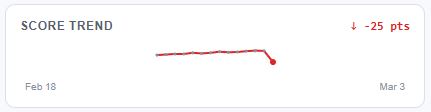
- Stores up to 50 historical scans per URL
- Visual sparkline graph shows score trend over time
- Date range and point change indicator (+/- pts)
- Data stored locally in your browser (chrome.storage.local)
Change detection
When you re-scan a page, Glippy highlights what improved and what regressed since the last scan. Green and red indicators on both the overall score and each category make it immediately obvious.
- Green indicator: score improved since last scan
- Red indicator: score decreased since last scan
- Per-category change indicators
Side-by-side competitor comparison
Enter a competitor's URL while viewing your results to see both GEO scores and category breakdowns in a split view. Compare all 10 categories side-by-side without leaving the extension popup.
- Enter any competitor URL to compare against your current page
- Scans competitor page in a background tab
- Split-view "VS" comparison with overall scores and grades
- Category-by-category breakdown showing score differences
- Visual indicators: green for categories where you're ahead, red where you're behind
- Priority-sorted recommendations extracted from your failed/warning checks
Export options: Plain Text, HTML, CSV, Markdown, PDF, Google Drive
Multi-page scan
Scan up to 10 URLs at once from a single input. Glippy opens background tabs to scan each page sequentially and displays comprehensive results. Great for auditing multiple pages across your site in one session.
- Enter up to 10 URLs in a textarea (one per line)
- Sequential scanning with real-time progress indicator (e.g., "Scanning 3/10")
- Summary statistics: average score, score range, grade distribution
- Common issues table showing problems affecting multiple pages
- Category averages across all scanned URLs
Export options: HTML, PDF, Plain Text, CSV (Summary or Full), Markdown (Summary or Full), Google Drive
Badge score
After scanning a page, the GEO score appears directly on the extension icon in your browser toolbar. The badge is color-coded based on score range so you can see results at a glance.
- Score number displayed on extension icon
- Color-coded: green (80+), yellow (60-79), orange (40-59), red (below 40)
- Updates per-tab so each tab shows its own score
Bulk tab scan
Click the "Scan All Tabs" button to scan all your open browser tabs at once. Results are displayed in a dedicated panel with summary statistics. Perfect for auditing multiple pages during a site review.
- One-click "Scan All Tabs" button in the extension
- Automatically filters to HTTP/HTTPS URLs (skips internal browser pages)
- Shows scanning progress and count
- Results sorted by score (highest first)
- Summary showing scanned count, average score, and timestamp
Export options: HTML, PDF, Plain Text, CSV, Markdown, Google Drive
Page type detection
Glippy automatically detects the type of page being scanned and displays it as a badge alongside your score. Detected types include:
- Article — Blog posts, news articles, guides
- Product — E-commerce product pages
- Homepage — Site landing pages
- FAQ — Frequently asked questions pages
- Contact — Contact pages
- About — About pages
- And more — Glippy identifies many page types based on content signals